shoving 88x31 images into css
#it #shitpost #web!! this page was AI translated and may contain inaccuracies !!
#it #shitpost #web!! this page was AI translated and may contain inaccuracies !!
i’ve been fucking around (heh, pierdol.ing) optimizing my sccl.cc for quite a while now
first came the move from astro to zine - a separate shitpost about that. then cramming everything into 1 rtt - there’s already a deep-dive article dumped here.
tldr: the site is squeezed down to 13kb gzip, loads in a single TCP packet - one round trip for the data.
the site flies, but i wanna have those mainstream eightyeightythrityone images - the shitty little buttons everyone shoves into their site footer, like “powered by something”, links to buddies, clubs like 512kb.club and 14kb.club etc., cuz it’s just cool.
but there’s a catch: the site is optimized down to one request, and here come dozens of banners, each 200++ bytes, each with its own http request…
: gotta figure somethin out…
why the fuck am i stuffing a bit of history into articles? this looks AI as fuck, nobody’s gonna read it.
the 88by31 pixel format is an ancient web tradition, it all pretty much started with netscape: in 1996 they launched the “netscape now!” program - buttons you could put on your site to show you used their browser.
then microsoft picked up the idea with their internet explorer,
then geocities for its users,
then “best viewed in…”, “powered by…” etc.
: the browser wars spread these buttons all over the web.
over time, with decent search engines everyone forgot about this format, but now it’s getting hyped again.: neocities, indie web revival, various clubs (512kb.club, 14kb.club, no-js.club) - each has its own banner, and people are slapping them on sites en masse.
here’s an example of these banners - 13051 of them from 11011 neocities :expoding_head:
usually people insert banners with <img src="..."> and don’t give a fuck, i.e. something like this:

each banner is a separate http request, and each one often (if hotlinked) means the full cycle: DNS lookup (if cold), TCP handshake, TLS handshake.
: even if the image is only 200 bytes - the overhead is dozens of times bigger than the image itself.
thankfully most at least don’t hotlink and host banners themselves, but even with local hosting 67 requests is a fuckton, if HTTP/2 and keep-alive are enabled, some of the overhead gets amortized, but the initial setup is still there, and every request adds latency.
and my site is heavily optimized for 1 rtt - i can’t just go and add 67 requests, even though i might want to add 67 banners…
my philosuckphy won’t allow it
besides speed there’s also the bonus of bypassing russian TSPU - the first packet doesn’t get caught if it fits into initcwnd.
no fucking way to cram all the images into that same 1 rtt - too much data.
inlining them in HTML isn’t an option either - each base64 banner adds ~33% to its size, and i’ll overshoot initcwnd.
but there’s another way - bundle all the banners into one base64 CSS file and load it in ONE request - that’ll be a second request besides the main one, but you can have 100 banners in a single request. and really banners aren’t the site’s main content - so it’s fine that they don’t fit into 1rtt. my philosuckphy is more about keeping the site’s full functionality within 1rtt and so on.
basically the idea: at site build time the generator reads a config, fetches current banners (or takes local ones), converts them to base64, shoves them into CSS as background-image.
my css gets generated at site build time, with a config like this as input:
{
    "badges": [
      {
        "url": "https://example.com/assets/example.png",
        "href": "https://example.com",
        "alt": "example.com",
        "file": "1.png"
      },
      {
        "href": "https://test.com",
        "alt": "test.com",
        "local": "../img/test.com",
        "file": "2.png"
      }
    ]
}
there are two modes:
url - fetches the banner from the specified sitelocal - takes a local file (if the banner is already downloaded and in the repo)the generator walks the config, downloads/reads files, converts them to base64, generates css like:
.badge{display:inline-block;width:88px;height:31px;image-rendering:pixelated;image-rendering:crisp-edges}
.badge-0{background:url(data:image/gif;base64,R0lGODdhWAAfAHcAACH...) no-repeat 0 0}
.badge-1{background:url(data:image/png;base64,iVBORw0KGgoAAAA...) no-repeat 0 0}
/* and so on */
then in html instead of 67 <img> tags we insert 67 <a class="badge badge-N"> links with background images from css.
applied as a style: 
instead of 67 separate requests for each banner i get:
// if there are, say, fewer than 10 images - the css with banners will probably fit into 14kb too, though by this point tcp-slow start should have ramped up already, unless tspu chokes it and so on.
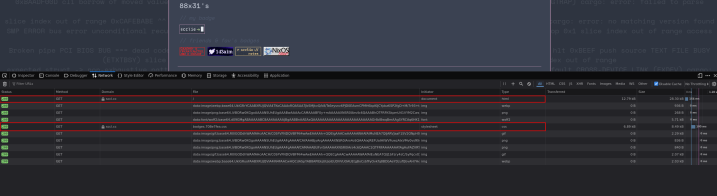
the “data:” lines aren’t http requests - that’s the browser decoding base64 into an image locally.
total:
if there are way more than 10 banners - the css file might not fit into one initcwnd and take 2 rtt. But the difference between 1 and 2 rtt isn’t dramatic when it’s not the main content. banners in the footer - the user doesn’t see them straight away anyway. besides, i have a fallback with little letter buttons without images
downsides:
in my case the profit is obvious: the site stays fast, the banners are there, the f12 network page in the debugger is tidy, everything looks right.
comments